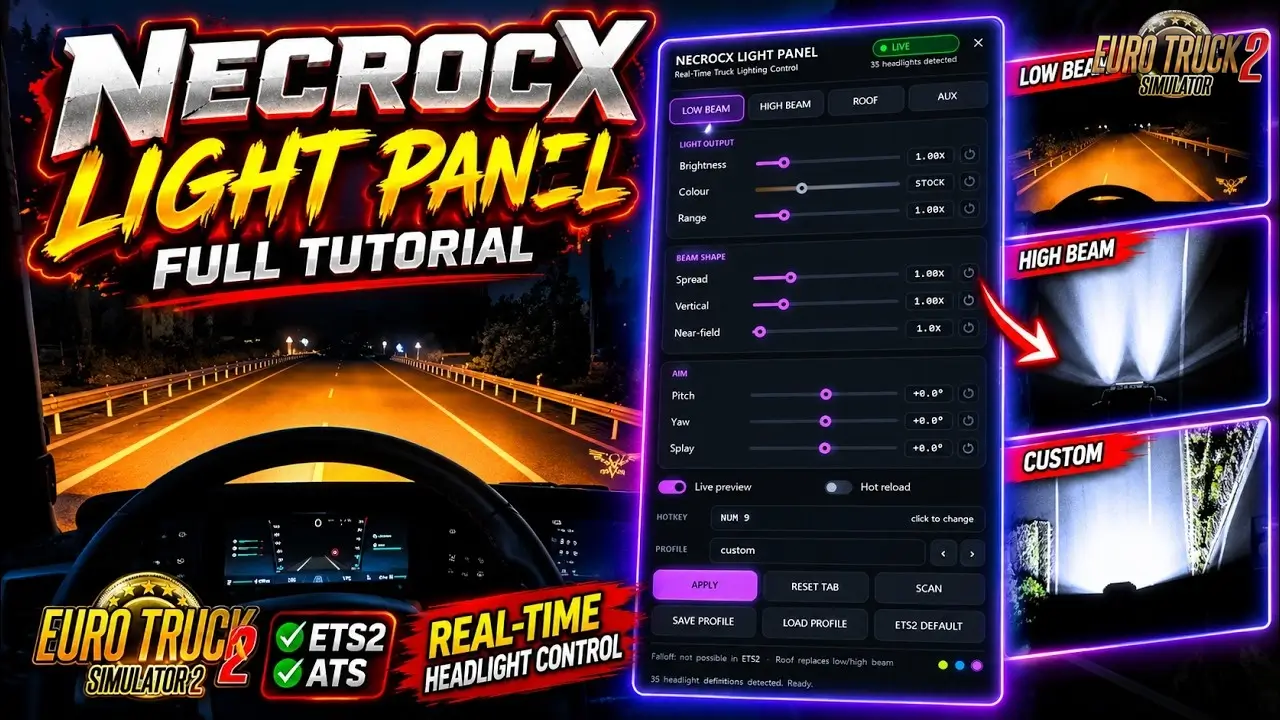
💡 NecroCX Light Panel PlugIn for ATS – this is a free in-game plugin that lets you tune your truck’s real road lights while driving. Change low beam, high beam, roof bar and front auxiliary lights independently and see the results immediately on the road. New in v1.5: full compatibility with headlight/lighting mods and improved ATS support.
Features NecroCX Light Panel:
– 🔦 Live tuning of Low Beam, High Beam, Roof and Front Aux lights
– 🎛️ Nine controls per light group:
– Brightness (0.05–5.00x)
– Colour temperature (1700–12000 K)
– Range, Spread, Vertical, Near-field
– Pitch, Yaw and Splay
– 💾 Profiles system (save and load your setups)
– 🔑 Customizable hotkey (default: Shift + Insert)
– 🚛 “My truck only” mode (especially useful in TruckersMP)
– 🛠️ Works with headlight and lighting mods
– 🖥️ No DirectX overlay – fully compatible with ReShade, DLSS, etc.
– 🎮 Compatible with ETS2 and ATS
Changes in v1.5:
– 🔄 Now works with headlight & lighting mods
– 🔄 Fixed ATS issues when certain trucks drive by
– 🔄 More reliable “Find my truck” function
– 🔄 Clearer status messages
– 🔄 Better logging for easier troubleshooting
Installation:
1. Close the game
2. Run Install.bat (choose ETS2, ATS or both)
3. Start the game and accept the SDK plugins notice
4. Sit in your truck → press Shift + Insert → press FIND MY TRUCK
👉️ Tested on game version 1.61.x
CategoryLights ATS
Game Versionv1.61.x
CreditsNecroCX Mods
Description — NecroCX Light Panel PlugIn v1.5 (1.61.x) for ATS
- ScreenshotsGallery
- VideoMedia
- ChangelogsUpdates


Changes in v1.4:
Changes in v1.3:
- TruckersMP support: new "My truck only" mode (on by default)
- Changes now go only to your own truck, not to every truck around you
- FIND MY TRUCK button: answer a few YES / NO questions and the panel finds your headlights
- Your truck is remembered, also after restarting the game
- Status shows "my truck only" or "ALL trucks" so you always know what changes
Changes in v1.3:
- American Truck Simulator support (tested in-game)
- Default panel key is now Shift + Insert, so Insert stays free for OptiScaler
- Choose your own panel key in the HOTKEY box
- Reset button on every slider, plus RESET TAB and ETS2 DEFAULT
- Mouse works on the panel as soon as it opens
- Panel is drawn without DirectX, so ReShade and DLSS add-ons leave it alone
Install «NecroCX Light Panel PlugIn v1.5 (1.61.x) for ATS» Guide 4 Steps
01
Download
Get the mod archive (.zip/.rar) from the links above.
02
Extract
Use 7-Zip or WinRAR. Find the .scs file.
03
Move File
Copy .scs to:Documents/American Truck Simulator/mod/
04
Activate
ATS → Mod Manager → Enable mod → Save & Play 🚛
Pro Tips: Match mod version • Backup saves • Test one mod at a time
Policy & Disclaimer for «NecroCX Light Panel PlugIn v1.5 (1.61.x) for ATS» Important Notice
External Links
We review all links at publishing, but cannot guarantee ongoing availability or safety of third-party resources.
Mod Ownership
All mods belong to their creators. We don't host files — downloads come directly from original authors or authorized mirrors.
Use Safely
Mods may affect stability. Always backup saves before installing. We aren't liable for issues from mod usage.
Download «NecroCX Light Panel PlugIn v1.5 (1.61.x) for ATS» Free Safe Tested
Version game: v1.61.x
Total views: 964
Support the Author
Enjoy this mod? A small contribution helps the modder keep creating free content for the ATS community! 🚛❤️
necrocx-light-panel-plugin-v1_5-1_61_x.zip [219.5 Kb] (downloads: 28)