Upload Mod
ATS Mods » Other mods » Graphics - Environments » Huxxi Reshade Packs v3.0 (1.57.x) for ATS

Huxxi Reshade Packs v3.0 (1.57.x) for ATS

2
+4
3 053 views
2 comments
CategoryGraphics - Environments
Game Versionv1.57.x
Credits
Edit By: admin24-01-2026, 00:37 · Mod Updated to v3.0
Description — Huxxi Reshade Packs v3.0 (1.57.x) for ATS
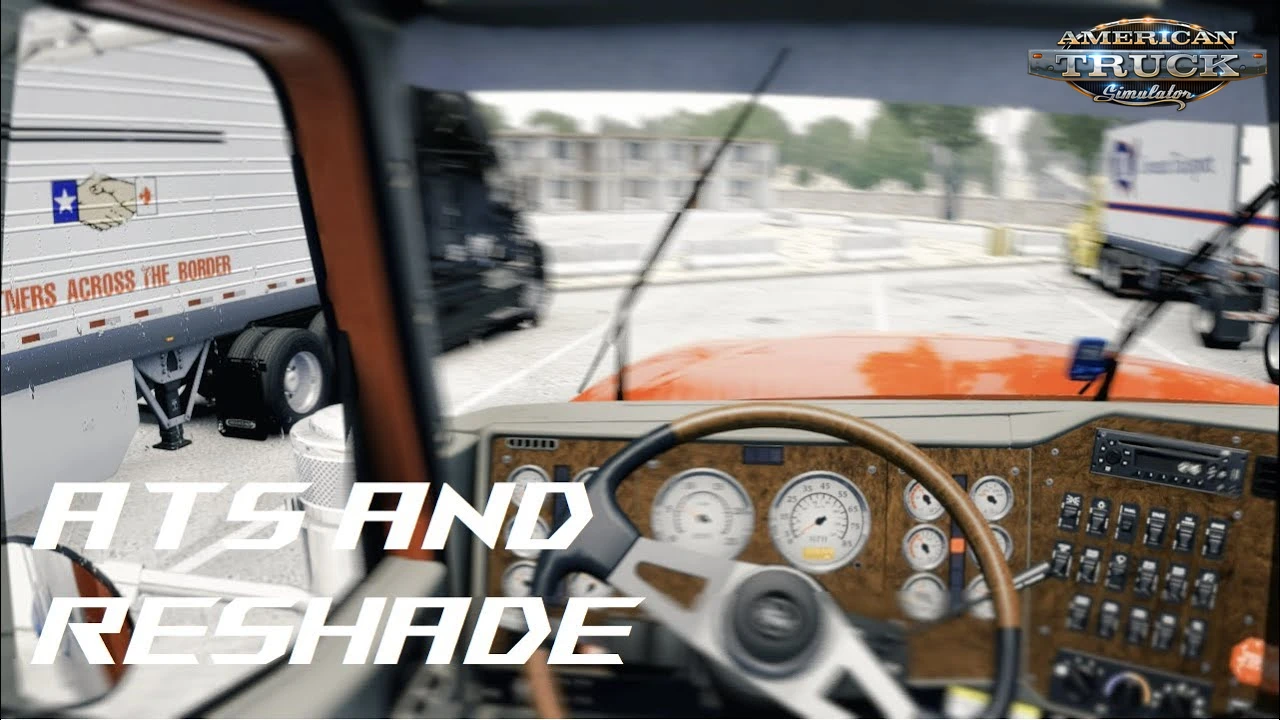
🎨 Huxxi Reshade Packs for ATS - transform your American Truck Simulator visuals with the Huxxi Reshade Pack, a carefully crafted set of presets designed to deliver cinematic atmosphere, natural realism, and immersive color tones for every driving condition. Whether you’re cruising highways at night, crossing forests in the rain, or exploring sunny mountain roads, these presets elevate your game’s look with tailored lighting and color balance.
Included Color Tones
– 🔵 Movie Blue Cinematic – Perfect for city highways & night drives
– 🔵 Movie Blue Realistic – Balanced blue tones with natural contrast
– 🌿 Natural Cinematic – Best for sunny, northern & mountainous regions
– 🌿 Natural Realistic – Clean lighting without oversaturation
– 🌧️ Leafy Green Cinematic – Ideal for rainy weather & forest routes
– 🌧️ Leafy Green Realistic – Subtle green tones for realistic environments
📌 Realistic versions feature lower saturation for a more natural look.
Available Versions for Each Preset
– ✅ Normal
– ✅ Normal HDR
– ✨ Bloom
– ✨ Bloom HDR
Visual Enhancements Explained
– ✨ Bloom Versions
 • Stronger & more realistic sun glares
 • Enhanced light reflections
– 🔍 HDR Versions
 • Increased sharpening
 • Ground textures & object details more visible
Recommended Add‑ons (Best Experience)
Pair these presets with:
– ✔️ Project Next Level 2.0
– ✔️ Snowymoon Filter C (Vibrance: 0.40)
– ✔️ Better Raindrops
(Other Snowymoon values can be fine‑tuned to personal preference.)

✅ Tested on game version 1.57.x
  • Screenshots
  • Changelogs
Huxxi Reshade Packs v3.0 (1.57.x) for ATSHuxxi Reshade Packs v3.0 (1.57.x) for ATSHuxxi Reshade Packs v3.0 (1.57.x) for ATSHuxxi Reshade Packs v3.0 (1.57.x) for ATS
Changes in v3.0:
– 🌅 Added new ReShade presets(brightens environment, reduces shadows, similar to JBX3 pre‑Snowymoon)
– 🏜️ Optimized for ATS deserts & low‑vegetation areas(Spain, Middle East, Texas, etc.)
– 🌲 Also usable in high‑vegetation regions(try and experiment for best results)
New Presets
– 🔵 Blue Exposed – best on dark, shadowy skyboxes (PNL / Weather 3.1 – City Highways)
– 🌿 Natural Exposed – best on scenic mountainous regions (PNL / Weather 3.1 – Scandinavia)
– 🌧️ Green Exposed – best during rainy conditions (PNL / Weather 3.1 – While Raining)

Changes in v2.0:
– 🎨 Improved ReShade presets for the best overall visual quality
Download Link 1​​​
huxxi_reshade_packs-v2_0.rar [167.76 Kb] (downloads: 105)


Quick Guide

Install Your ATS Mod in 4 Steps

Get rolling faster — simple setup for new trucks, maps & upgrades

01

Download

Get the mod archive (.zip/.rar) from the links above.

02

Extract

Use 7-Zip or WinRAR. Find the .scs file.

03

Move File

Copy .scs to:
Documents/American Truck Simulator/mod/

04

Activate

ATS → Mod Manager → Enable mod → Save & Play 🚛

Pro Tips: Match mod version • Backup saves • Test one mod at a time

Download Policy & Disclaimer

Transparent, safe, community-focused

External Links

We review all links at publishing, but cannot guarantee ongoing availability or safety of third-party resources.

Mod Ownership

All mods belong to their creators. We don't host files — downloads come directly from original authors or authorized mirrors.

Use Safely

Mods may affect stability. Always backup saves before installing. We aren't liable for issues from mod usage.

Download Mod «Huxxi Reshade Packs v3.0 (1.57.x) for ATS»
Verified admin
Version game: v1.57.x Total views: 3 053
huxxi-reshade-packs-v3_0-1_57_x.rar [208.76 Kb] (downloads: 217)
huxxi_reshade_packs-v2_0.rar [167.76 Kb] (downloads: 105)
Share Your Road Experience
Read Rules

💬 🚛 Tried this mod on your latest haul? Whether it turned your drive into a buttery‑smooth cruise, a chaotic “why‑is-my-truck-doing-that” moment, or something in between, drop your story below. Your wisdom helps fellow truckers avoid potholes — both on the road and in the mod list. 😄🛣️✨

Be constructive Join discussion Be respectful
Verification
By submitting, you agree to our Comment Rules
  1. Scott
    Scott Guests
    1 26 January 2026 05:10
    + 0-

    how do i add this into the game need a video guilde or something 

    1. admin
      admin Administrators
      0 26 January 2026 17:10
      + +1-

      Hello, 

      You need to follow these steps:


      Installing the Huxxi ReShade Pack (specifically the recent v3.0 for version 1.57.x) follows the same general process as most ReShade presets for American Truck Simulator, but requires precise placement to work correctly.


      Step 1: Install the ReShade Base
      Before adding Huxxi's specific settings, you must have the ReShade software installed.

      Download the latest version of ReShade from reshade.me.
      Run the installer and select American Truck Simulator from the list (if it's not there, click "Browse" and find amtrucks.exe in your Steam folder).

      Path: ...\Steam\steamapps\common\American Truck Simulator\bin\win_x64\amtrucks.exe
      Select DirectX 10/11/12 as the rendering API.
      When asked to select shader packs to install, it is best to check all or at least the "Standard," "SweetFX," and "Quint" packs, as Huxxi’s presets often rely on these.


      Step 2: Prepare the Huxxi Pack
      Once you have downloaded the Huxxi Reshade Pack (v3.0 or similar) zip file:

      Extract the contents of the zip file.
      Look for files ending in .ini (these are the presets) and a folder usually named reshade-shaders.


      Step 3: Copy Files to the ATS Directory
      You need to move these files into your game’s executable folder so ReShade can "see" them.

      Open your ATS game folder:

      Right-click American Truck Simulator in Steam.
      Go to Manage > Browse local files.
      Navigate to bin > win_x64.


      Paste the .ini files from the Huxxi pack directly into this win_x64 folder.
      Merge the "reshade-shaders" folder: If the Huxxi pack includes a reshade-shaders folder, copy it and paste it into win_x64. If Windows asks to "Overwrite" or "Merge," select Yes. This ensures any custom LUTs or textures Huxxi used are added.


      Step 4: Activate In-Game
      Launch American Truck Simulator.
      Once the game is at the main menu, press the [Home] key (or the key shown in the top-left banner) to open the ReShade overlay.

       
      In the top bar of the ReShade menu, click the drop-down menu (it likely says "ReShadePreset").

       
      Select one of the Huxxi presets from the list (e.g., Huxxi_V3_Realistic.ini).
      The screen may flicker for a moment while the shaders load.

      🔥 Transform your gaming experience with the best mods! 🚀 Discover, download, and play! 🎮

      🚛 ETS2 Mods 🏆 | 🚜 FS25 Mods 🌾 | ⚙️ ZagruzkaMods 🔧

      🔔 Subscribe and be part of the adventure! 🚀

ATS | American Truck Simulator | SCS Software

🚚 Welcome to Download-ATS.com — your ultimate destination for the best ATS mods! Here you can upgrade, customize, and transform your American Truck Simulator experience with thousands of free, high-quality modifications. Every mod is unique and carefully categorized to help you find exactly what you need. ✨

Looking to enhance your truck fleet? Explore top ATS truck mods including Peterbilt, Kenworth, Freightliner, Mack, Volvo VNL, International, European trucks, Russian trucks, cars, buses, and much more. 🛠️

Ready to discover new roads? Expand your world with popular ATS map mods like Coast to Coast, Viva Mexico, Mexico Extremo, CanaDream, Mario Map, Colombia, MHAPro, and many other community-favorite expansions. 🗺️🌎

What can you find here? A massive collection of ATS mods — trucks, maps, trailers, skins, interiors, graphics mods, physics mods, AI traffic packs, tuning parts, sound mods, and countless other additions to make your gameplay smoother, more realistic, and more fun. 🔧🚛

Are you a modder? 🚀 Share your creations with thousands of players! Upload your ATS mods for free in under one minute — no registration required. We also feature a dedicated section for ATS gameplay videos recorded by the community.