🎨 PhotoGrapfix - Nvidia Presets for ATS - is a free graphics enhancement guide created by modder Lionv8, shared on the official SCS Software forum for ATS players. it's a set of custom Nvidia Freestyle Game Filters (applied in-game via ALT+F3) combined with specific Nvidia Control Panel tweaks and recommended ATS in-game/config settings to dramatically improve visual fidelity. These presets aim for a "photographic" look with enhanced realism, without requiring Reshade or third-party injectors.
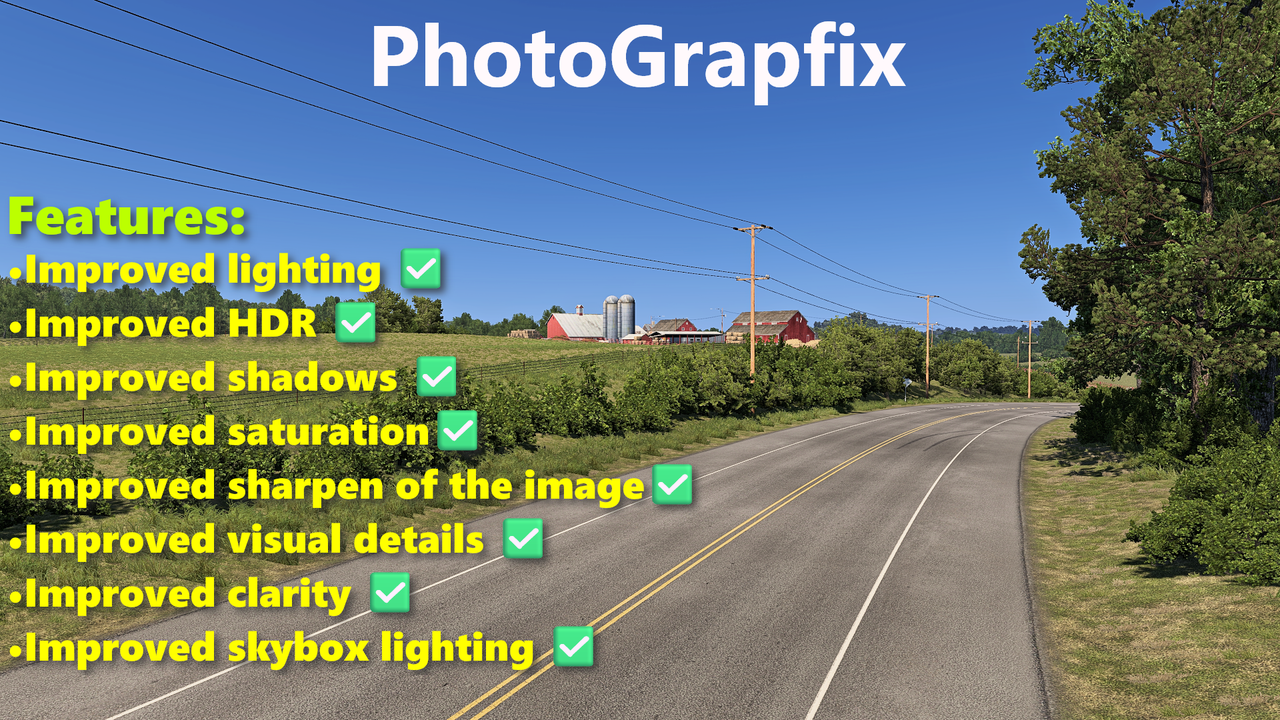
Features PhotoGrapfix:– 🌞 Improved lighting: highlights, sunlight color, and contrast
– 🌗 Enhanced HDR: deeper shadows and balanced brightness
– 🔍 Sharper image clarity and shadow detail
– 🌈 Balanced saturation and color vibrance
– 🧵 Increased texture sharpness and visual detail
– ☁️ Improved skybox and cloud lighting
– 🚛 More readable in-cab dashboards
– 📸 Overall photorealistic enhancement to base game visuals
– ✅ Works with base SCS lighting
– 🍂 Compatible with Grimes seasonal mods: Frosty Winter, Early Autumn, New Summer, Late Autumn / Mild Winter
System Requirements– 🟢 Requires
Nvidia GPU and
Nvidia App (formerly GeForce Experience)
– 🧩 Works only with
Nvidia Freestyle enabled
– 🔍 Scaling: 300% (or 200% for lower FPS)
– 🖼️ Anti-aliasing: TAA + SMAA
– 🧠 TAA tuning: Always Soft | Luma Sharpening: 2.00
– 🧵 Texture Quality: High | Anisotropic Filtering: x16
– 🪞 Mirror Quality/Resolution/Distance: High
– 🌫️ Shadow Quality: Ultra | Far Shadows: On | Interior Shadows: On
– 🌿 Vegetation & Grass: High
– 🌤️ Weather Quality: Ultra | Sunshafts: On
– 🚘 Traffic Headlights: On | Secondary Lights: Off
– 🎯 SSAO, DOF, Bloom: Off (disable bloom via console/config)
Disable in-game bloom by typing these commands in game console or changing the values in config file:
g_bloom 0
g_bloom_standard_deviation 0
g_bloom_override 0
Go to config file and change this values:
- uset r_drr_strength "z" <-- set this to 0
- uset t_averaging_window_duration "x" <-- set this to monitor's default refresh rate
- uset t_averaging_window_length "y" <-- set this to 2x the monitor refresh rate
- Change the r_buffer_page_size to 50
PhotoGrapfix - Nvidia Presets and Nvidia control panel settings
 Works only with base scs lighting.You can use other graphics mods that doesn't change the in-game lighting.These presets are also compatible with:-Grimes seasons mods: Frosty Winter, Early Autumn, New Summer, Late Autumn/Mild Winter.Set in-game brightness to 50%Recommended in-game settings for better visual and performance:
Scaling - 300%(If you still have issues with fps then lower it to 200%)
Vsync - Off
Anti-aliasing - TAA + SMAA
TAA tuning - Always Soft
TAA luma sharpening - 2.00
Anisotropic filtering- x16
Texture quality - High
Anisotropic filtering- x16
Normal maps - On
Reflection scaling 100%
Reflection detail - High
Mirror quality - High
Mirror resolution - High
Mirror distance - High
Shadow quality - Ultra
Far shadows - On
Interior shadows - On
SSAO - Off
Light visibility ranges - High
Traffic headlights - On
Secondary vehicle lights - Off
DOF - Off
Sunshafts - On
Vegetation detail - High
Grass density - High
Weather quality - Ultra
Pedestrians - On
Disable in-game bloom by typing these commands in game console or changing the values in config file:g_bloom 0
g_bloom_standard_deviation 0
g_bloom_override 0
Go to config file and change this values:- uset r_drr_strength "z" <-- set this to 0
- uset t_averaging_window_duration "x" <-- set this to monitor's default refresh rate
- uset t_averaging_window_length "y" <-- set this to 2x the monitor refresh rate
- Change the r_buffer_page_size to 50
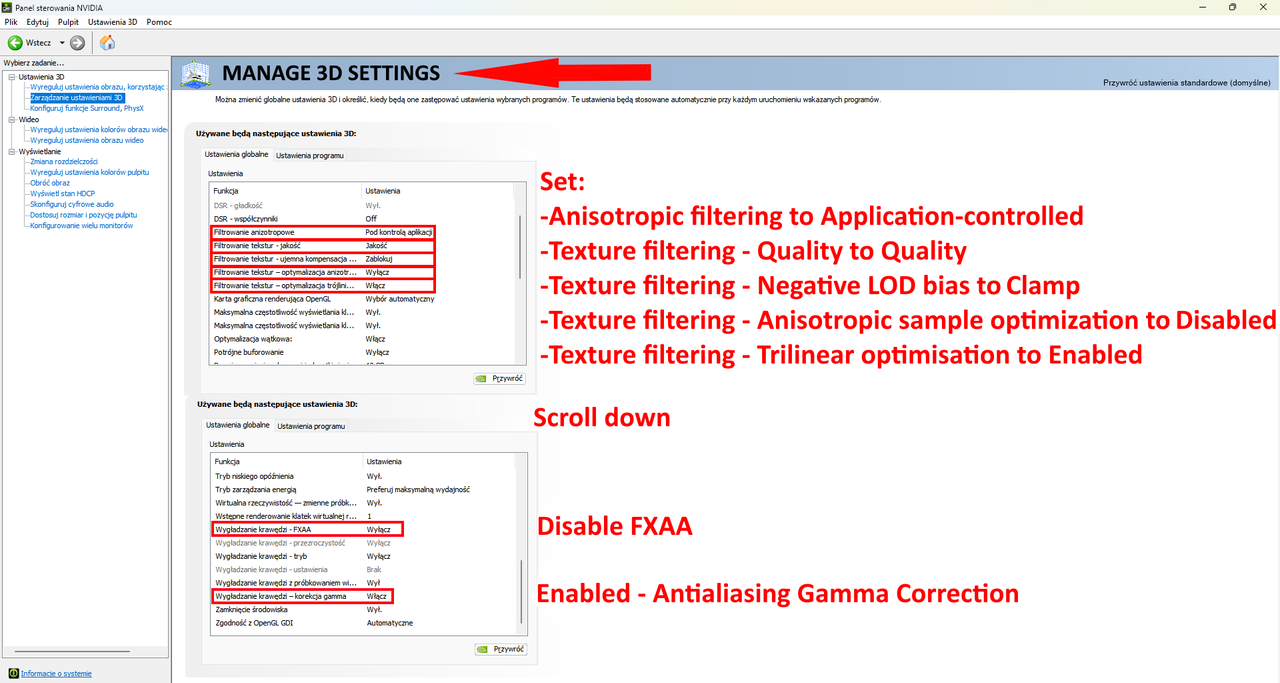
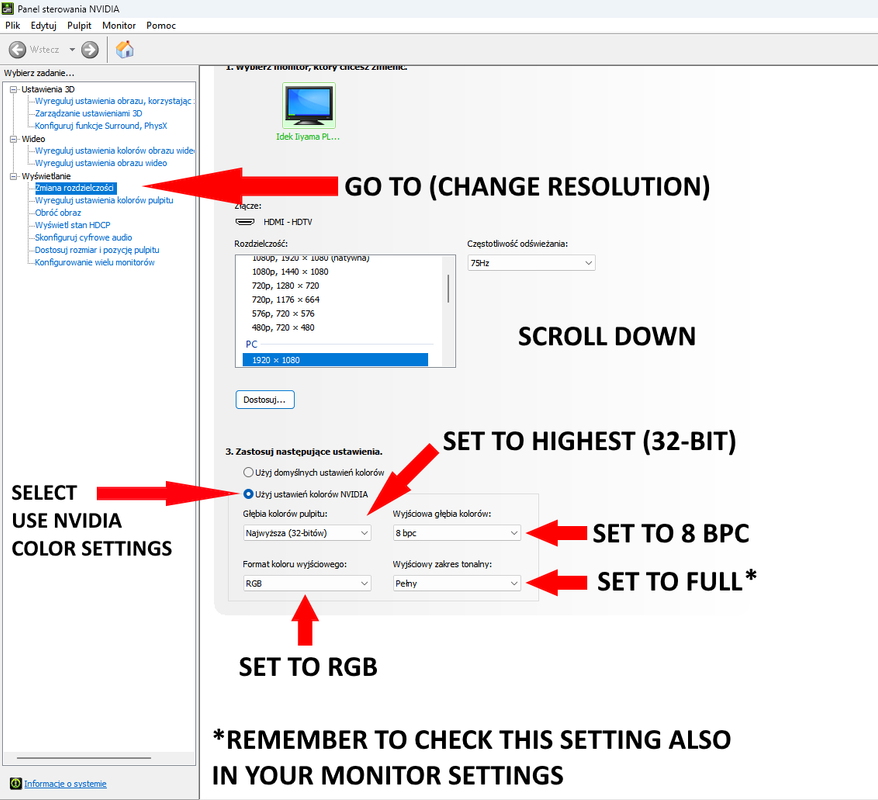
To use Nvidia presets you need to download the Nvidia App - https://www.nvidia.com/en-us/software/nvidia-app/After downloading enabled these options: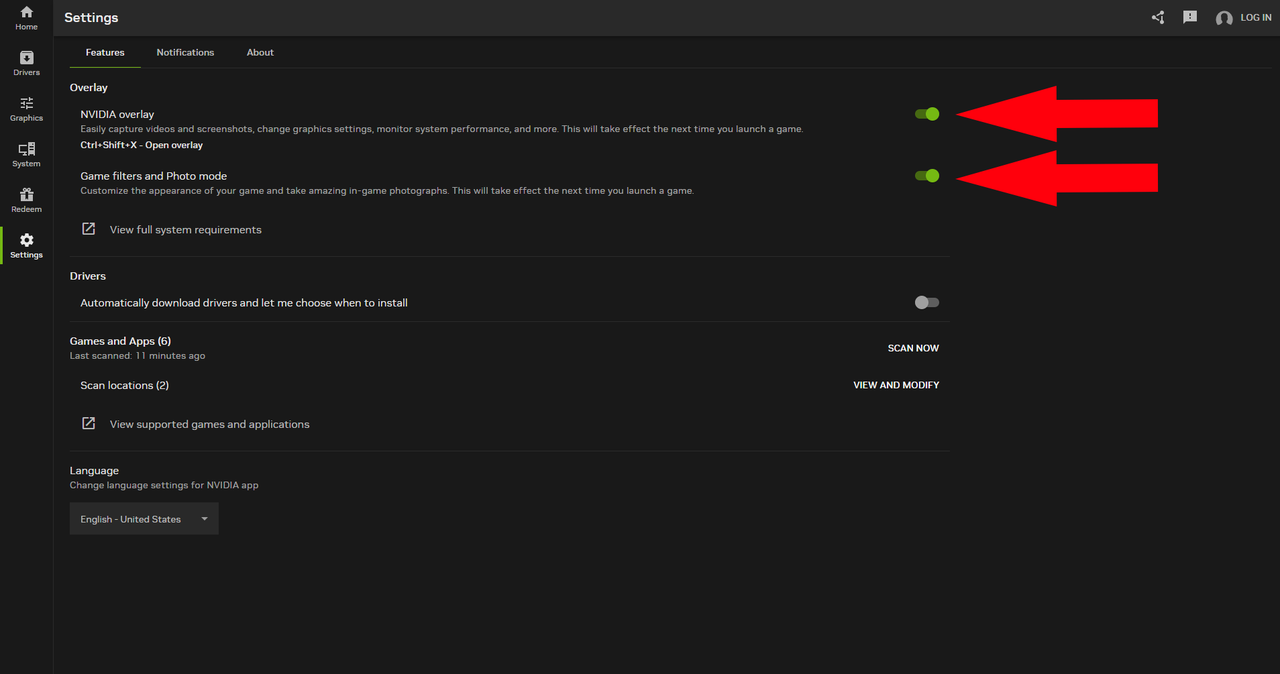 Then go to the Nvidia control panel and set these values:
🧾 Nvidia Freestyle Preset Values
– Brightness/Contrast:
• Exposure: -12% | Contrast: -10% | Highlights: 80% | Shadows: 30% | Gamma: -2%
– Details:
• Sharpen: 10% | Clarity: 20% | HDR Toning: 34% | Bloom: 0%
– Color:
• Tint Color: 42% | Tint Intensity: 13% | Temperature: 2% | Vibrance: 0%
– Sharpen+:
• Intensity: 5% | Texture Detail: 12%
🎮 Tested on game version 1.61.x
